
There have been lots of discussions in the Silverlight Developer Community recently about how to best implement the INotifyPropertyChanged interface.
In this blog post I’ll submit before the reader, what I perceive to be the simplest and the superior solution.
As you all know I’m a huge supporter of Silverlight open source projects, and in this blog post we'll use Mono.Cecil and PostSharp.
Download the projects from this blog post @ http://Justinangel.net/Storage/PostBuildMSILWeaving.zip
But first, INotifyWhatchaMaCallit?
Right, let’s start explaining this issue from scratch. For that, we need Cows!
Let’s setup a simple Silverlight form used for inputting the names of Cows.

Yes, Cows.
So first, we’ll start out by creating a simple POCO (Plain Old CLR Object) class to hold our Cow data.
public class Cow
{
public string FirstName { get; set; }
public string LastName { get; set; }
public string MiddleName { get; set; }
}
Next, We’ll create super simple form to represent our new Cow class.
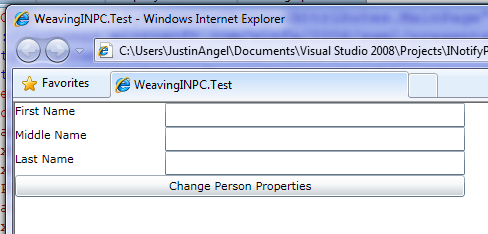
Normally, in real-world applications it would be best to use the DataForm control to create this form.
But for demo’s sake we’ll keep it simple with StackPanels and TextBoxs.
<StackPanel HorizontalAlignment="Left">
<StackPanel Orientation="Horizontal">
<TextBlock Text="First Name" Width="150" />
<TextBox Text="{Binding FirstName}" Width="300" />
</StackPanel>
<StackPanel Orientation="Horizontal">
<TextBlock Text="Middle Name" Width="150" />
<TextBox Text="{Binding MiddleName}" Width="300" />
</StackPanel>
<StackPanel Orientation="Horizontal">
<TextBlock Text="Last Name" Width="150" />
<TextBox Text="{Binding LastName}" Width="300" />
</StackPanel>
<Button x:Name="changeName" Content="Change Person Properties" />
</StackPanel>
Note the bolded and underlined {Binding} expressions that specify the connection between our POCO property and UI Elements.
After we’ve setup our bindings we’ll need to initialize the DataContext with some initial data. Like so:
this.DataContext = new Cow() { FirstName = "Bassy", MiddleName = "Won't Change", LastName = "LeCow" };
It’s an odd name for a Cow “Bassy ‘Won’t Change’ LeCow”, but it’s good enough for us.
Let’s fire up the form:
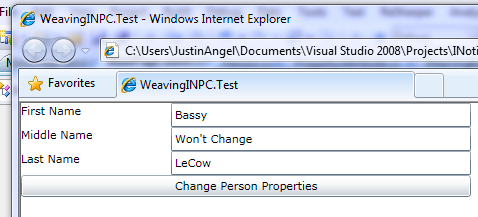
But here’s the core issue that starts off this whole INotifyPropertyChanghed discussion. How do we let the form know when the data changes?
Let’s see this problem in action.
We’ll implement the Button.Click event and change the First, Middle and last name of Bassy LeCow.
private void changeName_Click(object sender, RoutedEventArgs e)
{
Cow p = (Cow)this.DataContext;
p.FirstName = "Changed by manual implementation";
p.LastName = "Changed by Post-IL Weaving";
p.MiddleName = "Changed";
}
But what happens when we click our button?
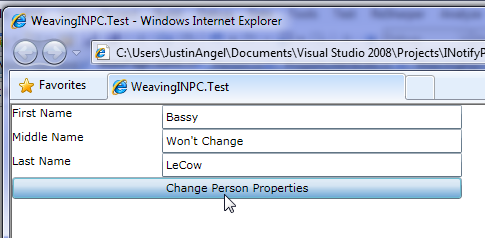
Nothing. Updating the underlying datasource hasn’t done a single thing to update our form.
Silverlight as a UI Framework has no way of knowing when our POCO property has been updated.
What’s the solution?

There are two solutions that could easily fit into this scenario:
1. Inheriting from DependencyObject and replacing all of our POCO properties with DependencyProperties.
Read more about that option at this SilverlightShow article.
2. Implementing the INotifyPropertyChanged interface and invoking PropertyChanged event in our property setters.
Up until recently, I was squarely in the DependencyObject camp.
But after a tempestuous round of discussions on the WPF Disciples mailing list and this aptly written blog post by Kent Boogaart I’ve moved to the INotifyPropertyChanged camp.
The core reason I decided on INotifyPropertyChanged was that you can’t use DependencyObjects in non-UI Disptacher threads. Which is a deal breaker.
Enough with your jibber jabber, show me the code!
So here’s the basic implementation of INotifyPropertyChanged for the FirstName property:
public class Cow : INotifyPropertyChanged
{
private string _firstName;
public string FirstName
{
get { return _firstName; }
set
{
_firstName = value;
RaisePropertyChanged("FirstName");
}
}
public string LastName { get; set; }
public string MiddleName { get; set; }
#region Implement INotifyPropertyChanged
public event PropertyChangedEventHandler PropertyChanged;
public void RaisePropertyChanged(string propertyName)
{
PropertyChangedEventHandler handler = PropertyChanged;
if (handler != null) handler(this, new PropertyChangedEventArgs(propertyName));
}
#endregion
}
We won’t go over the specifics, but it’s a fairly easy interface to implement, just fire the PropertyChanged event.
When comparing LastName implementation to FirstName implementation we can clearly see that it was much simpler to declare the LastName property.
It’s more readable, more maintainable, and has less chance of duplicating code throughout our system.
Solving the problem caused by the solution
There are a lot of options that were recently discussed for solving the syntax issue caused by declaring INPC (INotifyPropertyChanged) properties.
1) Ray Huston and Jonas Follesoe talk about Runtime substitution of INPC properties through Castle.DynamicProxy.
public class MyViewModel : IAutoNotifyPropertyChanged
{
public virtual string Name { get; set; }
public virtual int Age { get; set; }
public event PropertyChangedEventHandler PropertyChanged;
public void OnPropertyChanged(string propertyName)
{
if (PropertyChanged != null)
PropertyChanged(this, new PropertyChangedEventArgs(propertyName));
}
}
However, this method requires you stop using our beloved “New” keyword and start using runtime proxies. I’m not a fan of either of those.
A solid solution should have zero-impact on the way we write code today.
2) Michael Sync, Einar Ingebrigsten and Oren Eini talk about improving the syntax needed to declare an INPC property.
public class Employee : INotifyPropertyChanged
{
public event PropertyChangedEventHandler PropertyChanged;
private string _firstName;
public string FirstName
{
get { return this._firstName; }
set
{
this._firstName = value;
this.PropertyChanged.Notify(() => this.FirstName);
}
}
}
There are various sugar-coated syntaxes that have been suggested for INPC. but all of them require us to change the way we code.
3) Brad Abrams demos Silverlight WCF RIA Services generating the INotifyPropertyChanged and INotifyPropertyChanging interfaces for you.
But that only works if these types are declared on the server and are sent down to Silverlight. Additionally, if the property name changes it’s all still string based.
[DataMember()]
[Key()]
[ReadOnly(true)]
public int EmployeeID
{
get
{
return this._employeeID;
}
set
{
if ((this._employeeID != value))
{
ValidationContext context = new ValidationContext(this, null, null);
context.MemberName = "EmployeeID";
Validator.ValidateProperty(value, context);
this._employeeID = value;
this.OnPropertyChanged("EmployeeID");
}
}
}
Solving the problem caused by the Solution to the Solution of the Problem

Confused? Tired? About to start crying? Be a man for gods sakes!
Each of the existing solutions we’ve seen up until now has it’s own set of unique challenges.
All of which either creates weird, unnatural and repeatable C# Syntaxes, or relays heavily on string based solutions.
Post Build MSIL Weaving
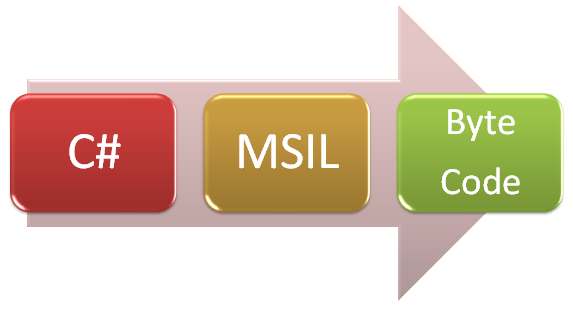
C# becomes MSIL, which later becomes Byte Code.
Remember those good old .Net 1.1 days when this chart looked important?
Well, I believe we’ve exhausted all the possible C# hacks to create sustainable and readable INPC properties in straight C# code.
The Silverlight & WPF developer community has been working on this for 2 years. Let’s think outside the C# box.
Specifically, let’s think in the MSIL box.
Post Build MSIL Weaving is the practice of taking compiled MSIL assemblies and manipulating them after compilation.
So, we can write C# code that manipulates our assemblies after they’ve been compiled.
In this article we’ll look at 2 approaches to doing Post-IL weaving: Mono.Cecil and PostSharp.
Low Level MSIL Weaving with Mono.Cecil
This method is super low-level and takes us down to writing code in MSIL with a custom MSBuild Task.
It’s not for everyone, but try and follow.
This is the C# Syntax I want us to end up with:
public class Cow : INotifyPropertyChanged
{
[Property]
public string LastName { get; set; }
1) We’ll start off by creating the PropertyAttribute in our Silverlight project:
[AttributeUsage(AttributeTargets.Property)]
public class PropertyAttribute : Attribute
{
}
2) Next, we’d like to create a Custom “AfterBuild” MSBuild task we can integrate into our project to read this attribute.
Let’s create a new Desktop project to hold that MSBuild Task:
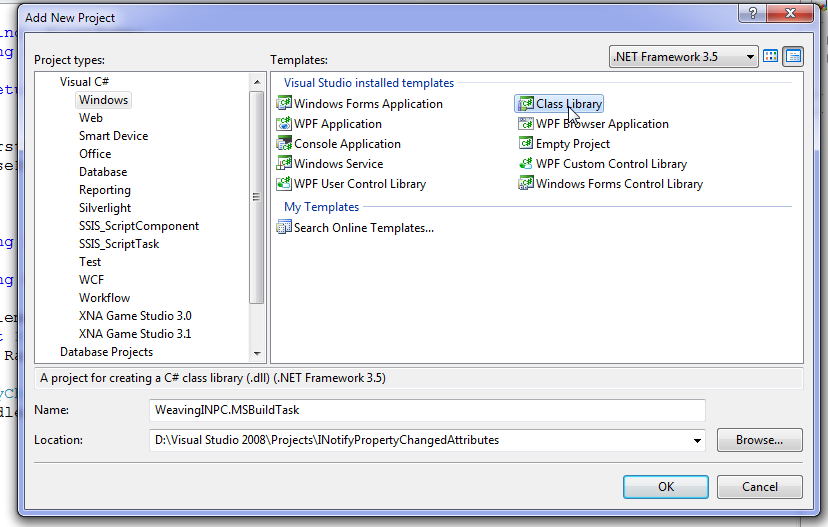
3) Add a reference to the MSBuild V3.5 DLLs:
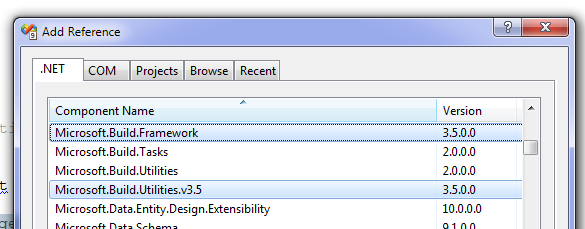
4) Now that we’ve got our MSBuild references we’ll create a custom MSBuild task:
public class WeavingInpcTask : Task
{
public override bool Execute()
{
SearchForPropertiesAndAddMSIL();
return true;
}
private void SearchForPropertiesAndAddMSIL()
{
}
[Required]
public string SolutionDir { get; set; }
}
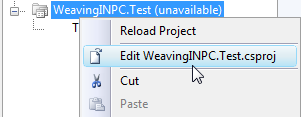
5) We’ll need to tell our Silverlight project to execute this task after building our project.
To do that we’ll unload our Silverlight project and add a reference to this task after build.

<UsingTask
TaskName="WeavingINPC.MSBuildTask.WeavingINPCTask"
AssemblyFile="$(SolutionDir)WeavingINPC.MSBuildTask\bin\$(Configuration)\WeavingINPC.MSBuildTask.dll" />
<Target Name="AfterBuild">
<WeavingINPCTask SolutionDir="$(SolutionDir)" />
</Target>
6) Download the latest Mono.Cecil binaries from http://mono.ximian.com/daily/ MonoCharge.
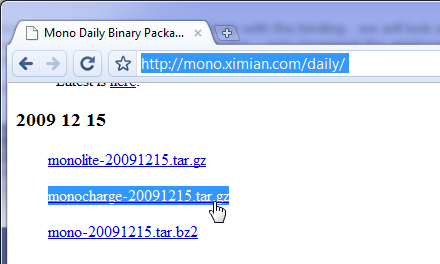
7) Add a reference from our MSBuild project to the unzipped Mono.Cecil.DLL.
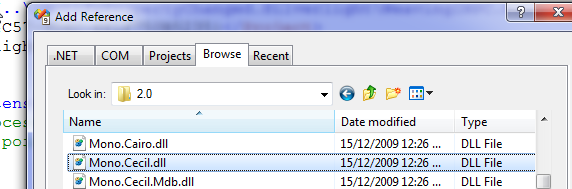
Now that we’re done with all the grunt work of setting up an MSBuild Mono.Cecil project we can get down to business.
Here’s how our class looks like:
public class Cow : INotifyPropertyChanged
{
private string _firstName;
public string FirstName
{
get { return _firstName; }
set
{
_firstName = value;
RaisePropertyChanged("FirstName");
}
}
[Property]
public string LastName { get; set; }
public string MiddleName { get; set; }
#region Implement INotifyPropertyChanged
public event PropertyChangedEventHandler PropertyChanged;
public void RaisePropertyChanged(string propertyName)
{
PropertyChangedEventHandler handler = PropertyChanged;
if (handler != null) handler(this, new PropertyChangedEventArgs(propertyName));
}
#endregion
}
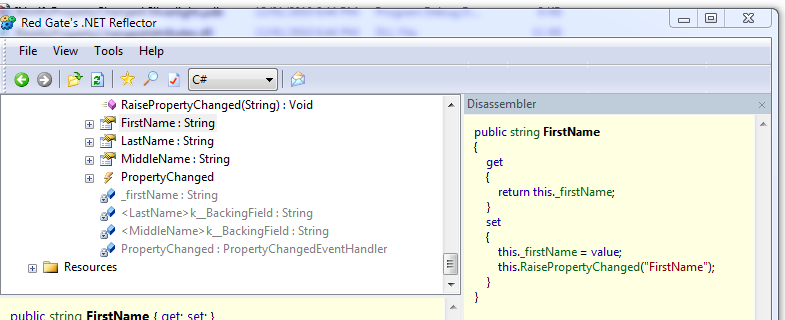
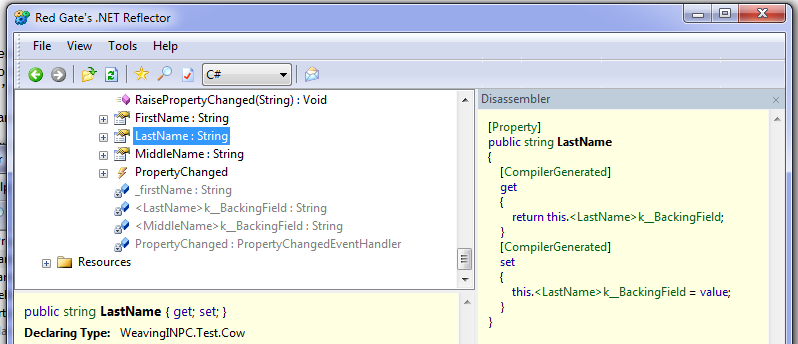
FirstName manually implements INotifyPropertyChanged.
LastName should be auto implemented by Mono.Cecil.
And Middle Name won’t have any INPC support at all.
Let’s open up reflector and see the differences between FirstName and LastName:
But wait, we don’t really care about the C# differences, do we? We care about MSIL!
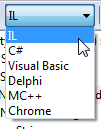
So let’s change reflector to show us the IL code.
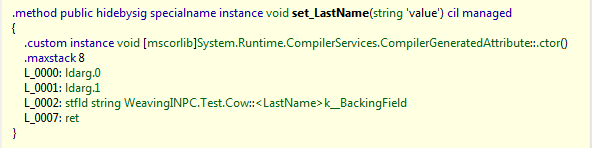
Here’s the set_LastName method MSIL and you can see it doesn’t call RaisePropertyChanged:
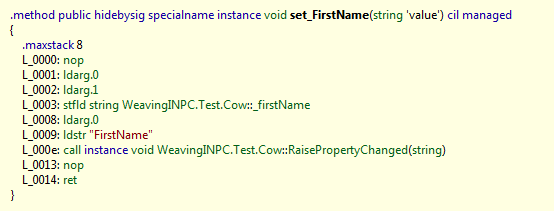
And here’s the set_firstName method MSIL that does invoke RaisePropertyChanged:
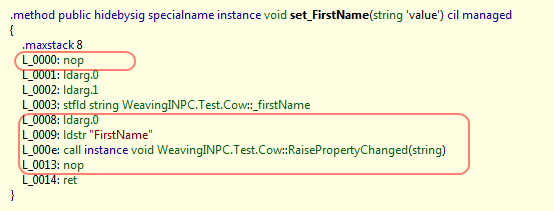
We can see that if we’re going to add MSIL directly to set_lastName we’re going to need to add these 5 lines of MSIL:
Let’s write the code to load up all the assemblies in our solution and find all properties that have the PropertyAttribute:
foreach (string assemblyPath in Directory.GetFiles(SolutionDir, "*.dll", SearchOption.AllDirectories))
{
AssemblyDefinition sourceAssembly = AssemblyFactory.GetAssembly(assemblyPath);
foreach (TypeDefinition type in sourceAssembly.MainModule.Types)
foreach (PropertyDefinition prop in type.Properties)
foreach (CustomAttribute attribute in prop.CustomAttributes)
if (attribute.Constructor.DeclaringType.FullName == typeof(PropertyAttribute).FullName)
{
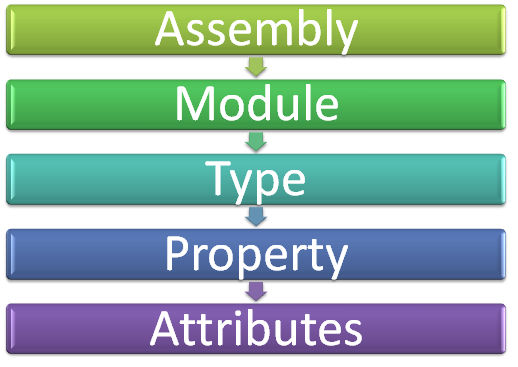
Here’s the object model we have to go through to find usages of PropertyAttriubte:
Next, we’ll add those 5 lines of MSIL:
CilWorker MSILWorker = prop.SetMethod.Body.CilWorker;
Instruction ldarg0 = MSILWorker.Create(OpCodes.Ldarg_0);
Instruction propertyName = MSILWorker.Create(OpCodes.Ldstr, prop.Name);
Instruction callRaisePropertyChanged =
MSILWorker.Create(OpCodes.Call, raisePropertyChanged);
MSILWorker.InsertBefore(prop.SetMethod.Body.Instructions[0], MSILWorker.Create(OpCodes.Nop));
MSILWorker.InsertBefore(prop.SetMethod.Body.Instructions[prop.SetMethod.Body.Instructions.Count - 1],
ldarg0);
MSILWorker.InsertAfter(ldarg0, propertyName);
MSILWorker.InsertAfter(propertyName, callRaisePropertyChanged);
MSILWorker.InsertAfter(callRaisePropertyChanged, MSILWorker.Create(OpCodes.Nop));
This isn’t the simplest code you’d ever seen for sure.
But It’s not that hard to see how these 5 InsertBefore/InsertAfter become our 5 MSIL lines.
Look for the words “nop", “ldarg_0”, “ldstr” and “call”. And then it becomes pretty clear we’ve just implemented the missing MSIL.
Next we’ll build our project.
And reflect into set_LastName:
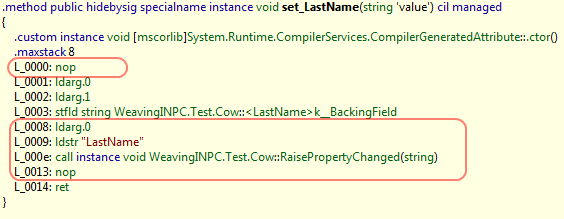
Isn’t that cool? We’ve added 5 lines of MSIL directly into our property.
Let’s run our solution:
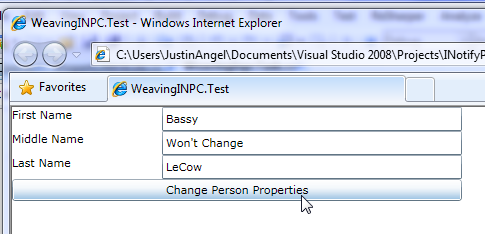
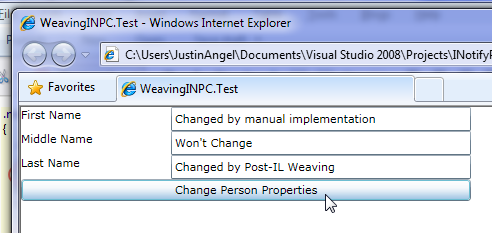
So FirstName was changed by our manual INPC implementation, and LastName was changed by our Post-Build MSIL Weaving.
We can now take this solution all the way home and end up with this syntax:
public class Cow : INotifyPropertyChanged
{
[Property] public string LastName { get; set; }
[Property] public string MiddleName { get; set; }
[Property] public string LastName { get; set; }
}
High Level MSIL Weaving with PostSharp
Some people would find MSIL intimidating, writing your own build tasks frightening and reinventing AOP a daunting task.
Those developers are essentially pansy little girls, but let’s see a more straightforward way of doing Post-Build MSIL Weaving.
Step #1: Go to the PostSharp website, register to the website, and install PostSharp. Make sure you close down Visual Studio during installation. Seriously.

Step #2: Add a reference to PostSharp.Loas.SL.dll and PostSharp.Public.SL.dll from your Silverlight project.
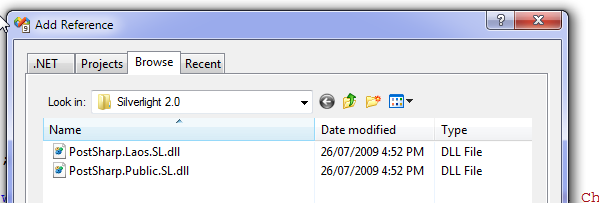
(On my dev box PostSharp installed to: C:\Program Files (x86)\PostSharp 1.5\Reference Assemblies\Silverlight 2.0\)
Step #3: What? We’re done?
That was pretty much all the setup you had to do.
Next, we’ll add a the PropertyAttribute so it inherits from OnMethodInvocationAgent and override OnInvocation:
public class PropertyAttribute : OnMethodInvocationAspect
{
public override void OnInvocation(MethodInvocationEventArgs eventArgs)
{
eventArgs.Proceed();
}
}
We’ll make sure that the attribute was applied on a Setter.
public class PropertyAttribute : OnMethodInvocationAspect
{
public override void OnInvocation(MethodInvocationEventArgs eventArgs)
{
eventArgs.Proceed();
if (eventArgs.Method.Name.StartsWith("~set_"))
{
}
}
}
And lastly we’ll call the RaisePropertyChange method with the property Name.
public class PropertyAttribute : OnMethodInvocationAspect
{
public override void OnInvocation(MethodInvocationEventArgs eventArgs)
{
eventArgs.Proceed();
if (eventArgs.Method.Name.StartsWith("~set_"))
{
MethodInfo method = eventArgs.Instance.GetType().GetMethod("RaisePropertyChanged");
method.Invoke(eventArgs.Instance, new object[] {(eventArgs.Method.Name.Replace("~set_", string.Empty))});
}
}
}
This is how our class looks like:
public class Cow: INotifyPropertyChanged
{
private string _firstName;
public string FirstName
{
get { return _firstName; }
set
{
_firstName = value;
RaisePropertyChanged("FirstName");
}
}
public string LastName { get; [Property] set; }
public string MiddleName { get; set; }
#region Implement INotifyPropertyChanged
public event PropertyChangedEventHandler PropertyChanged;
public void RaisePropertyChanged(string propertyName)
{
PropertyChangedEventHandler handler = PropertyChanged;
if (handler != null) handler(this, new PropertyChangedEventArgs(propertyName));
}
#endregion
}
Let’s run our sample:
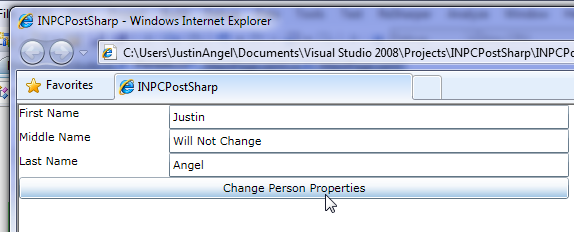
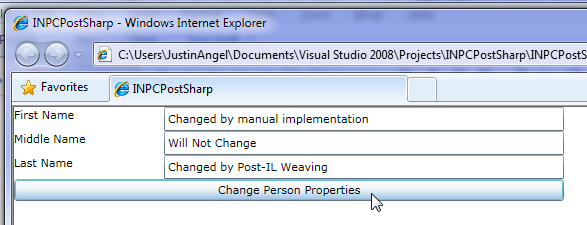
And Indeed, Post Build MSIL Weaving worked great here as well.
In reflector we can see the Post-IL weaved code in Last Name:
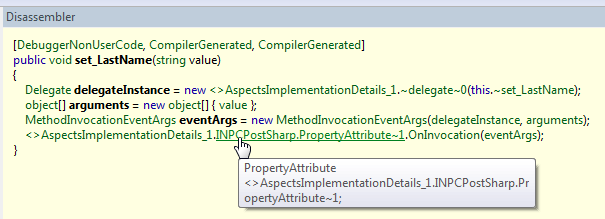
It isn’t really clear when you first look at it.
But basically, this code just invokes our PropertyAttribute method at runtime.
So PostSharp weaved some MSIL to invoke our code, but not the code itself.
We can take this solution all the way home and end up with this syntax:
public class Cow : INotifyPropertyChanged
{
public string LastName { get; [Property] set; }
public string MiddleName { get; [Property] set; }
public string LastName { get; [Property] set; }
}
What’s next?
In this article I’ve shown 2 Post-Build MSIL weaving techniques:
1) Mono.Cecil – that changes MSIL directly at compile time.
2) PostSharp – that changes MSIL to invoke our code at runtime.
If you’re going to use any of these options, you’ll have to consider where it’s best for you to apply your attribute – on the class? on each property? on the entire assembly?
Are you going to implement INPC with default values, raising notifications only on changes, cross-property change notifications, and a myriad of other features? Or just stick to the basics?
If you’re going to go with Mono.Cecil you’ll have to work a bit more on the infrastructure of the MSBuild tasks and Visual Studio integration.
If you’re going to go with PostSharp you’ll have to spend some time looking at the various classes and overloads offered in the framework.
Plus, you’ll have to consider the performance and payload ramifications.
Fin
In my opinion, Post-Build MSIL Weaving provided us with the best and simplest solution.
We can support the property INPC syntax:
public class Cow : INotifyPropertyChanged
{
public string LastName { get; [Property] set; }
public string MiddleName { get; [Property] set; }
public string LastName { get; [Property] set; }
}
or the class INPC syntax:
[INPC]
public class Cow : INotifyPropertyChanged
{
public string LastName { get; set; }
public string MiddleName { get; set; }
public string LastName { get; set; }
}
or even go with the assembly Wide syntax:
[assembly: INPC()]
Each of these syntaxes affords us total control of our INotifyPropertyChanged scenario without having to change the look, feel and flow of our code.
Sincerely,
-- Justin Angel





Comments
Rob Says:
Also, normally I would prefer intercepting all properties and just marking acceptions with an ignore attribute. I think that would be the more common scenario.
Justin Angel Says:
1) How do you handle more complex scenarios?
Personally, I wouldn't. The point here is to be proactively lazy and write less repeatable code.
If you've got a 0.01% edge case, I'm not a fan of encapsulating that in a framework.
So for "FullName" scenarios and "Age"<=>"DateOfBirth" scenarios i'd still fire INPC manually. (Although in a type safe manner and not using strings)
2) Convention over Configuration.
Yeah, Applying a "INPCAttribute" on a class is definitely a possibility. But you might as well go all the way and implement that on a namespace or assembly.
I think it really depends on the project and the amount of code/thinking it ends up saving you.
Glenn Block Says:
I agree with Rob, in most cases public properties on VMs do implement INPC. We had discussed doing something like this internally and were looking to both the global attribute as well as the per-member attribute [Notify] for example, and a way to turn off notification as an override to the global.
This is cool stuff though!.
Luciano Evaristo Guerche (Gorše) Says:
* Supposing the FullName property was implemented in the Cow class as follows
*/
public string FullName
{
get
{
return string.Format(CultureInfo.InvariantCulture, "{0} {1} {2}", this.FirstName, this.MiddleName, this.LastName);
}
}
/*
* I would subscribe to the PropertyChanged event as follows
*/
public Cow()
{
this.PropertyChanged += this.OnPropertyChanged;
}
/*
* And implement OnPropertyChanged handler as follows
*/
private void OnPropertyChanged(object sender, PropertyChangedEventArgs e)
{
switch (e.PropertyName)
{
case "FirstName":
case "MiddleName":
case "LastName":
this.RaisePropertyChanged("FullName");
break;
}
}
/*
* What are your thoughts about this approach?
*/
Christopher Bennage Says:
Sorry, the spirit of ALT.NET consumed me for a moment there.
Laurent Bugnion Says:
Justin Angel Says:
I was actually giving it some thought as well.
As always the problem is you can't nest delegates/lambdas in C# attributes, like so:
[Property((VM myVM) => myVM.Foo)]
Since that's not supported, you'll have to declare that fluent DSL outside the attribute. (in the c'tor?)
And it ends up the solution to this problem generates more code then it saves in most cases.
Glenn Block Says:
Justin Angel Says:
BUT, that's not the problem we're trying to solve.
I don't mind implementing INPC manually, it's easy and I have to do it once at the uber-baseclass level.
There's no redenudancy that needs to be encapsulated there.
The core problem MSIL Weaving helps us solve is the repeatable property syntax.
Given that proper architecture can avoid duplicating INotifyPropertyChanged interface implementations, I'm inclined to just implement it.
However, proper architecture does not help us solve the property syntax problem.
Jonas Follesø Says:
The MSIL weaving solution is really elegant and non-intrusive once you got it setup. I guess which option you pick depends on where you want your magic to happen.
Deff. agree on keeping these automatic INPC solutions as simple as possible, and go for manual change notification for computed properties (FullName, Age etc).
Agree that prob. with DynamicProxy is instantiation of the VM's. Going to do a follow up post tonight showing how to use it as a type provider in Ninject and get INPC when requesting the VM from the IoC.
But this is deff one of the most elegant solutions I've seen so far.
BTW: Doing a lightning talk on INotifyPropertyChanged at the local user group, so thanks for collecting different strategies in one post.
Rob Says:
Laurent Bugnion Says:
The winner for me is the solution that does not force me to add yet an external dependency to my application. This is why I never wanted to add PostSharp to the MVVM Light Toolkit.
Finally, I do like that you can fall back to the "classic" way to implement more complex logic. Fact is, you will never be able to cover everyone's needs with an automatic property, no matter what it does. In some cases I need to raise the PropertyChanged event twice for different properties, in other cases some calculation will be involved, etc... Leaving the possibility to fall back is IMHO the wise thing to do.
In short: I think it is the best solution I saw so far (and I saw many). Congrats.
Laurent
Jonas Follesø Says:
How easy is it to distribute the msbuild task? Can it be added as a simple DLL to a Lib folder under source control? No GAC or anything like that? I.e. just get latest, build and voila?
Assume you will have a stab and see if this could be a nice addition to MVVM Light?
Gael Fraiteur Says:
Thank you for blogging about PostSharp.
Just a precision: implementing this pattern will be much easier in PostSharp 2.0, see http://www.postsharp.org/blog/introducing-postsharp-20-1-notifypropertychanged.
The catch is that it does not support (yet) Silverlight, but you can already try this in WPF. Or look at the Samples directory in the PostSharp installation directory.
-gael
Justin Angel Says:
Nice of the creator of PostSharp to drop by.
It looks like what you're doing in that sample is over-kill.
You're also implementing the INPC interface as an aspect.
Which looks like it doesn't really address the core problem (of duplicating setter code) and just makes the solution more complex.
It's definitely an approach some in the aspect world might fancy, but I'd like to keep my solutions simple when it comes to MSIL Weaving.
Tim Erickson Says:
Justin Angel Says:
Great question. It doesn't.
Mono.Cecil changes the PDBs alongside with the assemblies, so you can "Step into" your new MSIL code. Same old debugging exprience as ever.
PostSharp marks the property itself as "don't step into", but lets you step into the Property.OnInvoke code at runtime.
So you get a perfect debugging exprience with whichever option you choose.
Egor Says:
Rob Says:
Nick Kramer Says:
Einar Ingebrigtsen Says:
One thing that I improved in my solution is that I wanted the properties to be able to be set from any threads without the code setting it to have to be aware of the dispatcher. So I inject code for handling that as well, read my latest post on it: http://www.ingebrigtsen.info/post/2010/01/16/Dispatcher-Safe-INotifyPropertyChanged.aspx.
Jonathan van de Veen Says:
I do disagree with this being a 'lazy' solution. I simply don't write POCO code anymore. I have them generated from some metadata.
Also the whole INPC stuff is encapsulated in a base class that I use for these POCO classes. This way I can write the 100 or so classes I need in about 5 seconds and not worry about any of that code containing any repeating code.
Other than that, really cool stuff.
Egor Says:
Kirill Says:
I'm trying to make the debugger work with the mono.cecil patched dll, and I can't - I saw your other post where you ran into similar issues. If you don't mind, would you please share with me how exactly were you able to overcome debugger issues. Also, if that's OK to ask, would you mind sending me your final version, please? Thanks a lot!
TDaver Says:
Dmitri Says:
Pavel Says:
When i try to debug Silverlight app it works, but when i try to debug WPF app i recive errors like "Can't set breakpoints". Is there a solution for this problem?
Jordão Says:
Tolu Says:
Great post!
The code sample doesn't seem to declare the raisePropertyChanged method before using it. Am I missing something?
Nick Says:
John Marks Says:
Great post. I cut our application over from using PostSharp to Mono.Cecil. I ran into a problem with the assembly rewriting happening after the DLL was packaged into the XAP file.
I worked around this by hacking the .csproj file to make the XapPackager Target dependent on my custom Task. See link to blog post for more info.
After that it works like a charm!
sacha Says:
Sacha Barber (WPF Disciple) here. I emailed you about me doing something very similar to this this other day and I wanted to write a post/article on it and include this code too. Is this ok with you. I'll assume it is ok if I don't hear back, as I guess you would like more people to see this post than not.
Hope that is ok with you?
Email me back via this email or get me on Disciples list
Steve B Says:
Another solution I've seen somewhere (I don't remeber where) is to use the new dynamic keyword of c# 4.
The idea is to raise the PropertyChangedEvent within the TrySetMember method...
However I've to admit I'm not very fan of this solution, because you loose the intellisense, and you still have to store the value somehow... But this solution merits to be mentionned :)
hth
steve
Lex Lavnikov Says:
Sorry for advertisement of my codeplex project ;)
It's a MSBuild task, runs between compilation and assembly signing during build of your .NET or Silverlight project.
Does IL weaving of public properties, calling RaisePropertyChanged if property is changed. Produces optimal IL, supports nullable types, leaves no traces after the build of its own existence ;)
Take a look: http://kindofmagic.codeplex.com
Kelqualyn Says:
And me to...
My solution is like Runtime substitution of properties through Castle.DynamicProxy called Yappi...
Core difference is - property setters are implemented though user provided delegates. All parameters, describing implementing property is provided on delegate-construction time and most of them are generic. It helps to implement any template property access logic without reflection (all reflection is done once on Type construction)...
Visit http://yappi.codeplex.com/ for details.
Thanks.
Samar Says:
MethodInfo raisePropertyChanged =
typeof(WeavingInpcTask).GetMethod("RaisePropertyChanged", new Type[] { typeof(string) });
Instruction callRaisePropertyChanged =
MSILWorker.Create(OpCodes.Call, sourceAssembly.MainModule.Import(raisePropertyChanged));
Regards,
Samar
Kira Says:
prageeth Says:
stuff like this.
Like this.
Rick Baker Says:
Rama Says:
In my last posting, I had a question about loading the data before the form loads. That issue is resolved. Now the data is loading but has some major issues. I have a collection that has 5 rows. Each row has INotifyPropertyChange data. If one of the row has data that cannot fit in one page, it does not print that row on multiple pages. How can i resolve this issue. This is urgent and I really need your help.
Thank you for all your time,
Rama
cod3monk3y Says:
int _age;
int Age {
get { return _age; }
set {
if(value != _age) {
_age = value;
NotifyPropertyChanged("Age");
if (Changed != null) Changed(this, EventArgs.Empty)
}
}
}
which is a slightly more complicated scenario than this MSIL manipulation can handle (or that I'm willing to give control over to).
There's another solution that uses reflection (which is equally as nauseating as the lambda code):
public bool IsCritical
{
get { return _isCritical; }
set
{
_isCritical = value;
Notify(MethodBase.GetCurrentMethod());
}
}
bool _isCritical = false;
void Notify(MethodBase property)
{
if (property.Name.StartsWith("set_")) {
string name = property.Name.Substring(4);
PropertyChanged(this, new PropertyChangedEventArgs(name));
}
}
Thanks for the post. I like the idea.
cm
cod3monk3y Says:
public event EventHandler FirstNameChanged = delegate { };
public string FirstName {
get { return _firstName; }
set {
_firstName = value;
FirstNameChanged(this, EventArgs.Empty);
}
}
Firing an event MyPropertyChanged that matches the name MyProperty will also update the binding targets for CLR properties. Total behind the scenes magic if you aren't aware of this.
cm
Dickhead Says:
Panos Roditakis Says:
Regards,
Panos.
Tony Henrique Says: